It's 2026 and your computer cannot be used without EXPERT TEXT GLOBAL UI OS LAYER.
Get instant single-click/touch access to ALL your apps, information/files and to the Internet


Android, Linux, UNIX ,and ChromeOS
Music
Blackjack
Diary
EXPERT TEXT GLOBAL UI OS LAYER for macOS or Mac OS X (running Intel CPUs with WINE and other emulators), and for Apple devices like iMacs, iPhones, iPads, Macbook Airs, MacBook Pros, or Mac Minis with Apple CPUs (runnng the UTM Virtual machine - or other virtual processors)
Current builds
Click here to download EXPERT TEXT GLOBAL UI OS LAYER (EXPERT TEXT GLOBAL UI OS LAYER.zip) and copy the downloaded file to your Applications folder and then double click/touch on it. Then double click/touch on the file named experttextglobal-UI-OS-LAYER Apple.exe in the folder named EXPERT TEXT GLOBAL UI OS LAYER.
Composer Surface 2012 v3.7 for macOS, Mac OS X (running WINE and other emulators), and for Apple devices like iPhones, iPads, Macbooks and Mac Minis with Apple CPUs (runnng the UTM Virtual machine - and other virtual processors)
Click here to download Composer Surface 2012 v3.7 (Composer Surface 2012 Apple.zip) and copy the downloaded file to your Applications folder and then double click/touch on it. Then double click/touch on the file named composersurface2012-3.7.exe in the folder named Composer Surface 2012.
Blackjack for macOS, Mac OS X (running WINE and other emulators), and for Apple devices like iPhones, iPads, Macbooks and Mac Minis with Apple CPUs (runnng the UTM Virtual machine - and other virtual processors)
Click here to download Blackjack, Blackjack Code Lexicon.zip, and double click/touch on it. Then double click/touch on the file named Blackjack Apple.exe in the Blackjack Code Lexicon folder.
This page is for users of macOS or Mac OS X (running Intel processors with WINE or other emulators), and for users of Apple devices like iMacs, iPhones, iPads, Macbook Airs, MacBook Pros or Mac minis with Apple processors (runnng the UTM Virtual machine - or other virtual processors)
Code Lexicon software runs on the macOS, Apple iOS, Mac OS X running the WINE emulator (and others) and the UTM Virutal Machine - and other virtual processors, and on all "future", "current" and "past" versions of Windows including: Windows 11, Windows 10, Windows 8, Windows 7, Vista, NT, XP, ME, 2000, 98, 95, 3.11, 3.11 for Workgroups, Windows 1.0, 2.0, 3.0. Code Lexicon software also runs on Unix, Linux, Android, ChromeBook, Chrome OS, Google Pixel and other environments using Windows emulators or virtual processors (virtualization).
Contact us: info@codelexicon.us sales@codelexicon.us
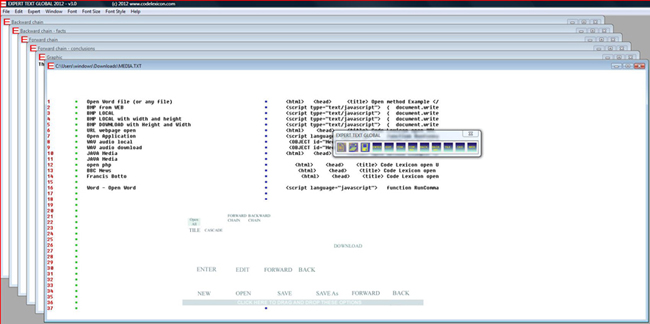
CLICK ON the screen image below to download our unlimited trial version of EXPERT TEXT GLOBAL UI 2015 v5.0, and then go to the download folder and double click on the file that has an "E" icon.
Do I need a Code Lexicon license?
The United States and the global economy are damaged by software theft; trillions of dollars are lost every decade, with the computer sector naturally being hit hardest of all. Jobs are lost or fail to materialize, companies fail to grow as they should and can even go bankrupt, and the economies in towns and cities suffer as a result.
There are many types of software theft that are often accidental, including:
Illegal downloads on the web
Using unlicensed software
Pirated or counterfeited discs or media
Computers that you may have purchased that include a number of unlicensed programs
You might not have realized that in your place of work you are using software illegally; perhaps your employer has not got an adequate single or corporate user license.
The use of unlicensed software has become increasingly detectable in recent years, by organizations like FAST (Federation Against Software Theft) and BSA (The Software Alliance).
https://www.fast.org/what-piracy/use-unlicensed-software
https://www.bsa.org/about-bsa
Approximately one third of the software used globally is being used illegally. Publicised fines for using unlicensed software have risen to as high as six figure amounts.
You need an appropriate Code Lexicon license if you:
- use any version of EXPERT TEXT GLOBAL UI OS LAYER for other than trial purposes
- use any version of Composer Surface 2012 v3.7 for other than trial purposes.
The publication of information about "any" codelexicon.us software or book in the press, media or in any published form without prior permission from the copyright holders/legal owners of the intellectual property herein, is strictly prohibited
Code Lexicon software remains the intellectual property of Francis Botto and Code Lexicon regardless of which legacy, current or future emulator or operating system, or hardware platform/device is used to run the Code Lexicon software. Equally Code Lexicon software remains the intellectual property of Francis Botto and Code Lexicon when integrated into legacy, current or future emulators, operating systems or hardware platform/device designs. The same applies to the integration of Code Lexicon software into any IS/IT infrastructure or implementation.
All features of Code Lexicon software are the intellectual property of Francis Botto and Code Lexicon regardless of whether or not they are documented on this website or in Code Lexicon publications. For example, the development of a script that is not documented by Code Lexicon does not entitle the developer to the copyright or ownership of Code Lexicon software or of the script. The same applies to the discovery of a feature or application that is not documented by Code Lexicon.
Code Lexicon software and all its features are the intellectual property of Francis Botto and Code Lexicon regardless of how Code Lexicon software is installed or deployed over networks that include intranets and the Internet. The same applies to end-user/developer scripts for Code Lexicon software; no matter how many end-user knowledge bases are sold or deployed by a licensed/unlicensed third-party vendor, Code Lexicon software and all its features remain the intellectual property of Francis Botto and Code Lexicon. .
Third party in-house or commercial products that generate EXPERT TEXT GLOBAL knowledge bases automatically, semi automatically or manually require permission or a license from Code Lexicon. An example third party product is a "Web browser recorder" where the user's browsing history is recorded in the form of an EXPERT TEXT GLOBAL knowledge base. A third party product that uses Code Lexicon software or Code Lexicon proprietary file formats requires a Code Lexicon license. Equally s third party product that processes Composer Surface music files or EXPERT TEXT GLOBAL knowledge bases requires a Code Lexicon license. The integration of a Code Lexicon software product into another collective technology solution requires a Code Lexicon license.
The production and/or distribution of in-house or commercial training courses and training materials about Code Lexicon software products requires permission or a license from Code Lexicon.
Code Lexicon software is the intellectual property of Francis Botto and Code Lexicon regardless of the number of Knowledge Bases a licensed/unlicensed third party vendor may sell or distribute. All versions of Code Lexicon Composer Surface remain the intellectual property of Francis Botto and Code Lexicon regardless of how many copies are sold or distributed by a licensed/unlicensed third party vendor. Similarly all versions of Code Lexicon Composer Surface remain the intellectual property of Francis Botto and Code Lexicon regardless of how many "instrument/music samples" or copies are sold or distributed by a third party licensed/unlicensed vendor. The same applies to Envelope Shaper where a licensed/unlicensed third party may distribute or sell "shaped envelopes" or copies of Envelope Shaper.
Code Lexicon software is the intellectual property of Francis Botto and Code Lexicon, and is available exclusively at www.codelexicon.com. www.codelexicon.net,, www.codelexicon.us and at www.francisbotto.com. It is a criminal offence to include Code Lexicon downloads (or links to them) on your websites without the prior permission of the intellectual property owners (Francis Botto and Code Lexicon). The same applies to books and articles written by Francis Botto. Currently free downloads of Francis Botto's dictionaries are available illegally from many free download sites on the Internet. Invoices will be sent by www.francisbotto.com to download sites offering illegally Code Lexicon software or Francis Botto books and articles as free downloads. Legal action will also be taken against the free download site if a satisfactory conclusion is not arrived at. If you think that your website offers illegal free downloads of Francis Botto books, articles or Code Lexicon software (or if you know of such a site), please contact Code Lexicon today so that the matter can be resolved amicably.Thank you for reading this important message.
(c) 2008-2019 Francis Botto (www.francisbotto.com), www.codelexicon.net, www.codelexicon.com and www.codelexicon.us.
All rights reserved.
No
part of this website/ publication may be reproduced without the prior
permission of the aforementioned copyright holders/intellectual property
owners. It is prohibited to reproduce and commercially sell or to give
away (illegally) any Code Lexicon software (including audio samples
and graphics), books or information on this site. Permission and licensing
can be obtained from the intellectual property owners so as you may
sell or give away the copyright material on this site.
Beta Builds
The Beta builds are 100% safe and will not damage hardware or software
Click here to download EXPERT TEXT GLOBAL UI OS LAYER 2025 1.5 (EXPERT TEXT GLOBAL UI OS LAYER 2025 1-5.ZIP) and copy the downloaded file to your Applications folder and then double click/touch on it. Then double click/touch on the file named EXPERT TEXT GLOBAL UI OS LAYER 2025 1-5.ZIP
Click here to download EXPERT TEXT GLOBAL UI OS LAYER 2025 1-0 (EXPERT TEXT GLOBAL UI OS LAYER 2025 1-0.zip) and copy the downloaded file to your Applications folder and then double click/touch on it. Then double click/touch on the file named EXPERT TEXT GLOBAL UI OS LAYER 2025 1-0.zip.
Click here to download EXPERT TEXT GLOBAL UI OS LAYER 2023 Beta 4 (for Windows)
EXPERT TEXT GLOBAL UI OS LAYER 2023 Beta 4.zip
Click here to download EXPERT TEXT GLOBAL UI OS LAYER 2023 Beta 3
EXPERT TEXT GLOBAL UI OS LAYER 2023 Beta 3.zip
Beta 3 executes the first six rules in the knowledge base on startup.
Click here to download EXPERT TEXT GLOBAL UI OS LAYER 2023 Beta 2
EXPERT TEXT GLOBAL UI OS LAYER 2023 Beta 2.zip
Beta 2 executes the first six rules in the knowledge base on startup.
Click here to download EXPERT TEXT GLOBAL UI OS LAYER 2023 Beta 1
EXPERT TEXT GLOBAL UI OS LAYER 2023 Beta 1.zip